

Description
Download Aralc Start – Windows 8 Style Web Browser Interface
Overview
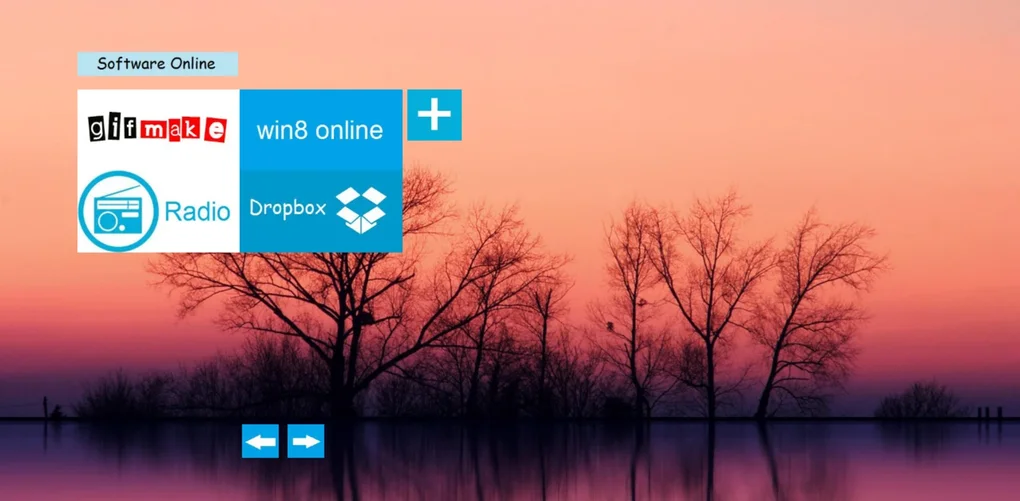
Aralc Start re‑imagines the classic Windows 8 “Metro” experience for today’s web‑savvy users. Instead of juggling dozens of browser tabs, the program gives you a clean, tile‑based start screen that launches your favorite sites in the browser of your choice—whether it’s Google Chrome, Mozilla Firefox, Microsoft Edge, or any other installed engine. The design philosophy is simple: provide a visually appealing, instantly recognizable interface that feels native to Windows while keeping the underlying functionality lightweight and fast. Because Aralc Start does not replace your browser, it works as a companion tool that stores URL shortcuts, custom icons, and background images, allowing you to personalize the look and feel without diving into complex configuration files. The application is free to download, secure (no hidden telemetry), and updates automatically when a newer version is released. For users who miss the tile‑centric aesthetic of Windows 8 or who simply want a more organized way to reach their most visited pages, Aralc Start offers an elegant, low‑overhead solution that blends nostalgia with modern convenience.
Feature Set & Personalization Options
- Metro‑style Tile Layout – A grid of large, clickable tiles that mimic the Windows 8 start screen, each representing a bookmarked website.
- Browser Agnostic Launching – Choose Chrome, Firefox, Edge, or any installed browser for each tile, giving you full control over which engine renders the site.
- Custom Icons & Backgrounds – Upload your own PNG or SVG icons, and set a high‑resolution background image or solid colour to match your desktop theme.
- Drag‑and‑Drop Tile Management – Rearrange, resize, or delete tiles with a simple drag‑and‑drop interface; no registry edits required.
- Live Tile Preview (Optional) – Enable live previews that show the latest thumbnail of a site, turning static tiles into dynamic shortcuts.
- Quick Search Bar – A built‑in search field that opens the query in your default browser, saving you an extra step.
- Automatic Updates – The app checks for new versions at startup and applies updates silently, ensuring you always have the latest security patches.
- Low Resource Footprint – Uses less than 30 MB of RAM and negligible CPU, making it suitable for older machines or systems with limited resources.
The feature list is deliberately concise, focusing on the core experience that differentiates Aralc Start from a simple bookmark folder. Each tile can store not only the URL but also a short label, making it easy to identify sites at a glance. For power users, the program includes an export/import function that saves your tile layout as a JSON file, allowing you to back up or transfer configurations between computers. The combination of visual flair and functional depth means you can create a start screen that feels uniquely yours while still benefiting from the speed and reliability of your preferred web browser.
Step‑by‑Step Installation, Configuration and Compatibility
Getting Aralc Start up and running is straightforward, even for those who are new to third‑party Windows utilities. Follow these steps to install and personalize the tool:
- Download the Installer – Visit the official Aralc Start page and click the “Download for Windows” button. The installer is a signed executable (approximately 8 MB) that works on Windows 7, 8, 8.1, and 10.
- Run the Setup – Double‑click the downloaded file. The wizard will guide you through the usual acceptance of the license agreement and selection of an installation folder (default:
C:\Program Files\AralcStart). - Choose Default Browser – During installation you’ll be prompted to set a default browser for tile launches. You can keep the system default or select a specific browser for the app.
- Finish and Launch – Once installation completes, the program automatically launches a welcome screen that offers a quick tour of the interface.
- Create Your First Tile – Click the “+” button on the start screen, enter the website URL, pick an icon (or let the app fetch a favicon), and assign the desired browser.
- Customize Appearance – Open the Settings panel (gear icon) to change the background image, adjust tile size, enable live previews, or import a previously exported layout.
- Automatic Updates – By default, Aralc Start checks for updates each time it starts. You can disable this in Settings if you prefer manual updates.
Aralc Start is built specifically for the Windows desktop environment. It supports 64‑bit and 32‑bit versions of Windows 7, 8, 8.1, and 10. While the core UI is optimized for high‑DPI displays, the program also scales correctly on lower‑resolution screens. Because it does not embed its own rendering engine, the app inherits the performance characteristics of the chosen external browser, meaning you get the same speed and security updates that you already receive from Chrome, Firefox, Edge, or any other installed engine.
Pros, Cons, Frequently Asked Questions and Final Verdict
Pros
- Visually striking Windows 8 Metro‑style interface that modernizes a classic design.
- Works with any installed browser, giving you full flexibility.
- Highly customizable icons, backgrounds, and tile sizes.
- Lightweight on system resources; suitable for older PCs.
- Free to download, with regular automatic updates.
- Export/Import feature for easy backup and migration.
Cons
- Limited to Windows; no native macOS, Linux, Android, or iOS versions.
- Live tile preview can slightly increase CPU usage on low‑end hardware.
- Advanced theming requires external image editing.
- No built‑in ad‑blocking; relies on the chosen browser’s extensions.
Can I use Aralc Start with Microsoft Edge?
Yes. During tile creation you can select Edge as the launch browser, or set Edge as the default for all tiles in the Settings panel.
Is there any cost hidden in the free version?
Aralc Start is completely free. There are no in‑app purchases, ads, or subscription fees. All updates are provided at no charge.
How does the app handle security and privacy?
The program does not collect browsing data. It only stores the URLs you add to tiles and the visual settings you configure. All network traffic occurs through the browser you select, inheriting its security model.
Can I sync my tile layout across multiple PCs?
Direct cloud sync is not built in, but you can export the layout to a JSON file on one computer and import it on another, effectively achieving manual synchronization.
Will Aralc Start work on Windows 11?
Yes. Although the UI is styled after Windows 8, the application runs without issues on Windows 11, and it automatically adopts the system’s dark or light theme when applicable.
Final Verdict: Aralc Start successfully bridges nostalgia and practicality. Its Metro‑style start screen provides an eye‑catching, organized way to launch web destinations without sacrificing performance or security. While the lack of cross‑platform support limits its audience, Windows users looking for a lightweight, customizable launch pad will find it a valuable addition to their workflow. The free price tag, straightforward installation, and solid feature set make it a recommendation we can give with confidence.
Ready to give your desktop a fresh, tile‑filled look? Download Aralc Start now and start personalizing your web shortcuts in minutes.
Guides & Tutorials for Aralc Start
How to install Aralc Start
- Click the Preview / Download button above.
- Once redirected, accept the terms and click Install.
- Wait for the Aralc Start download to finish on your device.
How to use Aralc Start
This software is primarily used for its core features described above. Open the app after installation to explore its capabilities.
User Reviews for Aralc Start 0
No reviews found





